 Telegram Growth Studio
Telegram Member Add Bot 2026
Complete Guide to Add Members to Groups & Channels Automatically
Learn how to add member in telegram group without contacts using our powerful automation tool with 43+ features. Step-by-step video tutorials included.

🎬 Video Tutorial: How to Use Telegram Member Add Bot
Before diving into the written guide, watch our comprehensive video tutorial showing exactly how to add member to telegram group and channel using our automation software. This tutorial covers everything from setup to your first successful member addition campaign.
What is a Telegram Member Add Bot?
A Telegram Member Add Bot is specialized automation software designed to help you grow your Telegram groups and channels by automatically adding targeted members. Unlike manual methods that are limited to 50-200 adds per day, our bot leverages multiple accounts and intelligent delay systems to safely add thousands of members while respecting Telegram's guidelines.
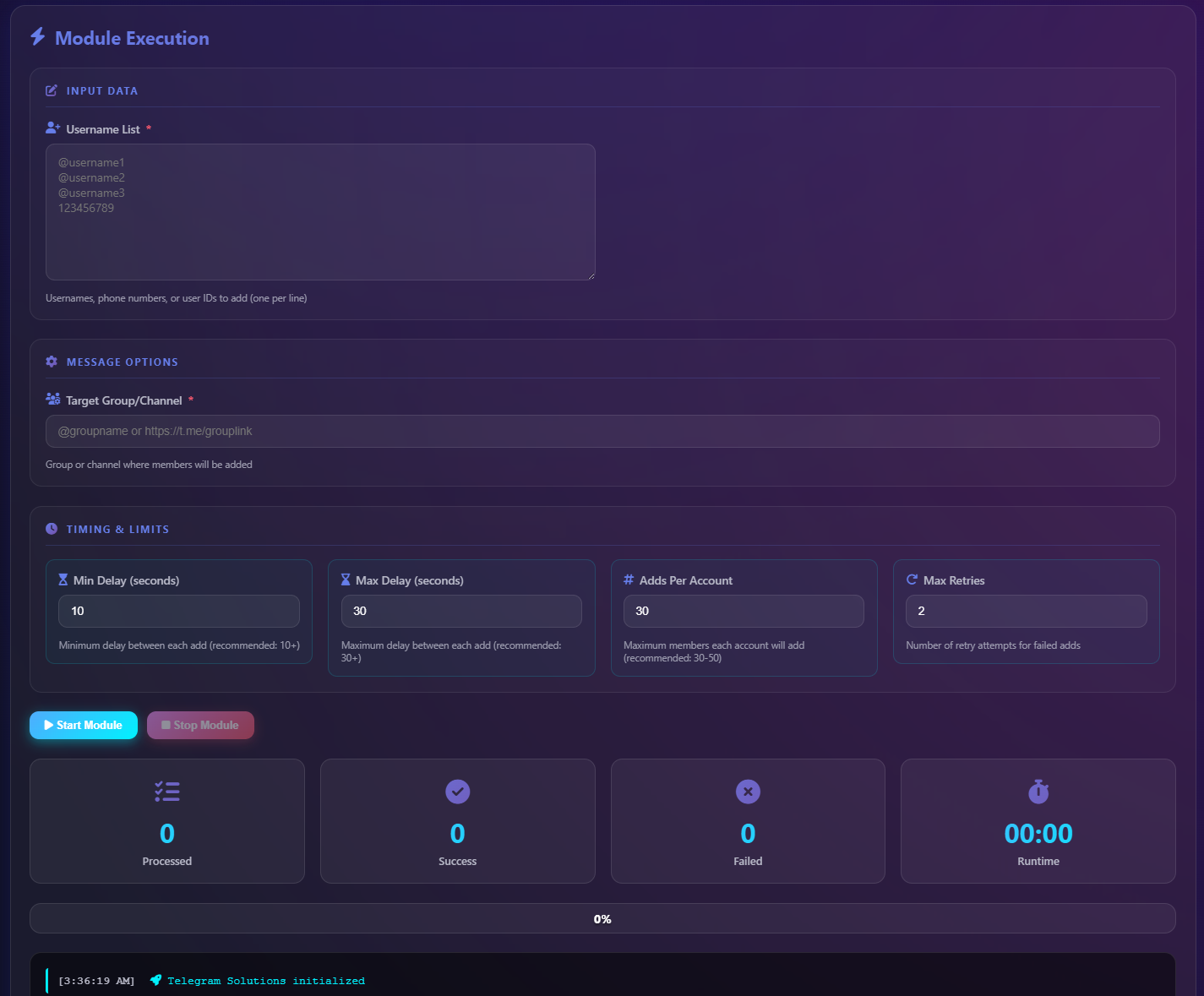
The software works by first scraping member lists from competitor groups, filtering for active real users, and then systematically adding them to your target group or channel. This process, which would take weeks manually, can be accomplished in days with proper automation. For those who prefer a done-for-you service, check out our Telegram Member Adder service page.
🎯 Targeted Adding
Add members from specific niches by scraping relevant competitor groups
👥 Multi-Account
Manage unlimited Telegram accounts with automatic rotation
🛡️ Safe & Secure
Built-in ban detection, spam checker, and safety protocols
📰 Telegram Member Adding in 2026: What Changed
As of 2026, Telegram's anti-abuse systems have grown noticeably stricter for bulk member adding. New accounts now face tighter early-life add caps, and the platform's flood-wait responses trigger faster when adds come in bursts, so conservative delays (closer to 30-60 seconds) and well-warmed accounts matter more than ever. In 2026, username-based adding still works, but a larger share of users have enabled the "who can add me to groups" privacy setting, which raises skip rates on scraped lists - making active-user filtering and clean targeting the difference between a healthy campaign and wasted invites. Our current best practice is to lead with quality scrapes, layer in aged, pre-warmed Telegram accounts, and pair every adding run with a follow-up Mass DM sequence so the new members actually engage instead of going silent. Slower, segmented adding now beats raw volume.
How to Add Members to Telegram Group - Step by Step
Learning how to add member in telegram group efficiently requires understanding the proper workflow. Whether you want to add members to a small community or scale to thousands, following these steps ensures success while keeping your accounts safe.
Download & Install the Software
Get the Telegram Member Add Bot from our secure download link. The software works on Windows 8 and above. Installation takes less than 2 minutes. Our Telegram Member ADD Software guide provides detailed installation instructions.
Login with Your Telegram Accounts
Enter your phone number to login. You'll receive a verification code in your Telegram app. For maximum efficiency, add multiple accounts. Each account can add 50-200 members daily, so 10 accounts means 500-2000+ daily additions.
Scrape Target Members
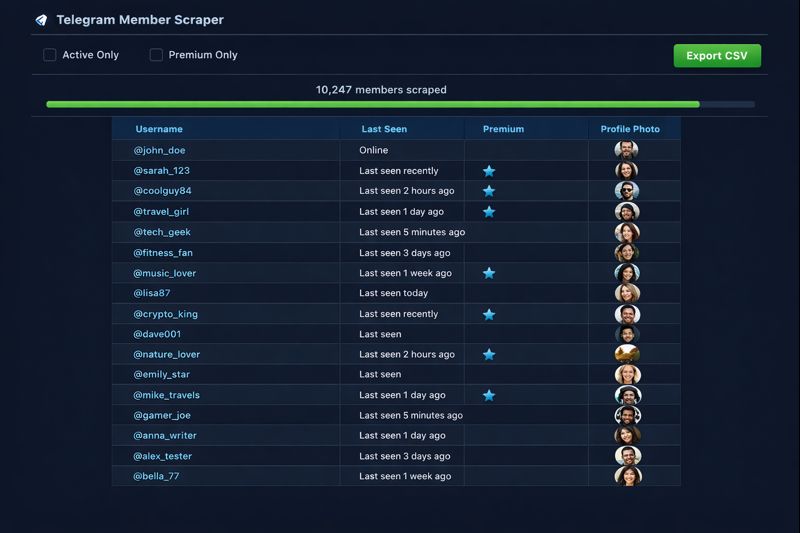
Use the built-in scraper to extract members from competitor groups. The software can scrape 10,000+ members at once, including hidden members where possible. Export the list to CSV for further filtering.
Configure Adding Settings
Set your target group or channel URL, configure delay intervals (15-60 seconds recommended), and choose how many members to add per session. The software automatically rotates between accounts to distribute the load.
Start the Adding Process
Click start and monitor the real-time progress. The dashboard shows successful adds, failed attempts (usually due to privacy settings), and account status. The list automatically updates as members are added.
How to Add Member in Telegram Group Without Contacts
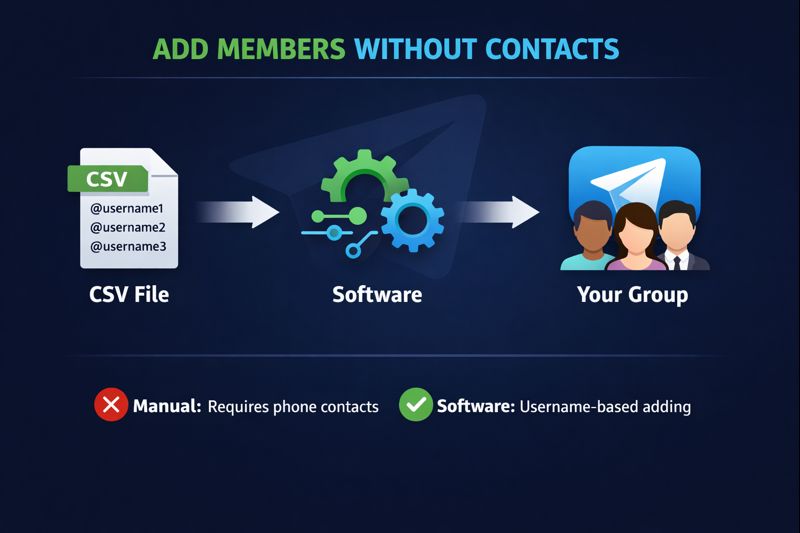
One of the most common questions we receive is "how to add member in telegram group without contacts" - and it's a great question. Traditional Telegram limits you to adding people from your contact list, but our bot bypasses this limitation entirely.
The secret lies in username-based adding. When you scrape a group, you're collecting usernames (in @username format), not phone numbers. The Telegram Member Add Bot then searches for each username and adds them to your group - no saved contacts required. This is how professionals achieve add member telegram channel and telegram add member to group operations at scale.
| Method | Requires Contacts? | Daily Limit | Best For |
|---|---|---|---|
| Manual Adding | Yes (phone number) | 50-200 | Small groups |
| Invite Link | No | Unlimited (passive) | Organic growth |
| Username Adding | No | 200 per account | Moderate scale |
| Member Add Bot | No | 2000+ (multi-account) | Rapid scaling |
For those looking to understand how to add new member to telegram group from scratch, the combination of scraping + automated adding is the most effective method. You can also leverage our Telegram Member ADD Tool for a simplified workflow.
🎬 Video Tutorial: Telegram Scraper Software
The foundation of successful member adding is having a quality list to work with. Our Telegram Scraper Software tutorial shows you exactly how to extract members from any public group or channel, filter for active users, and prepare your list for the adding process.
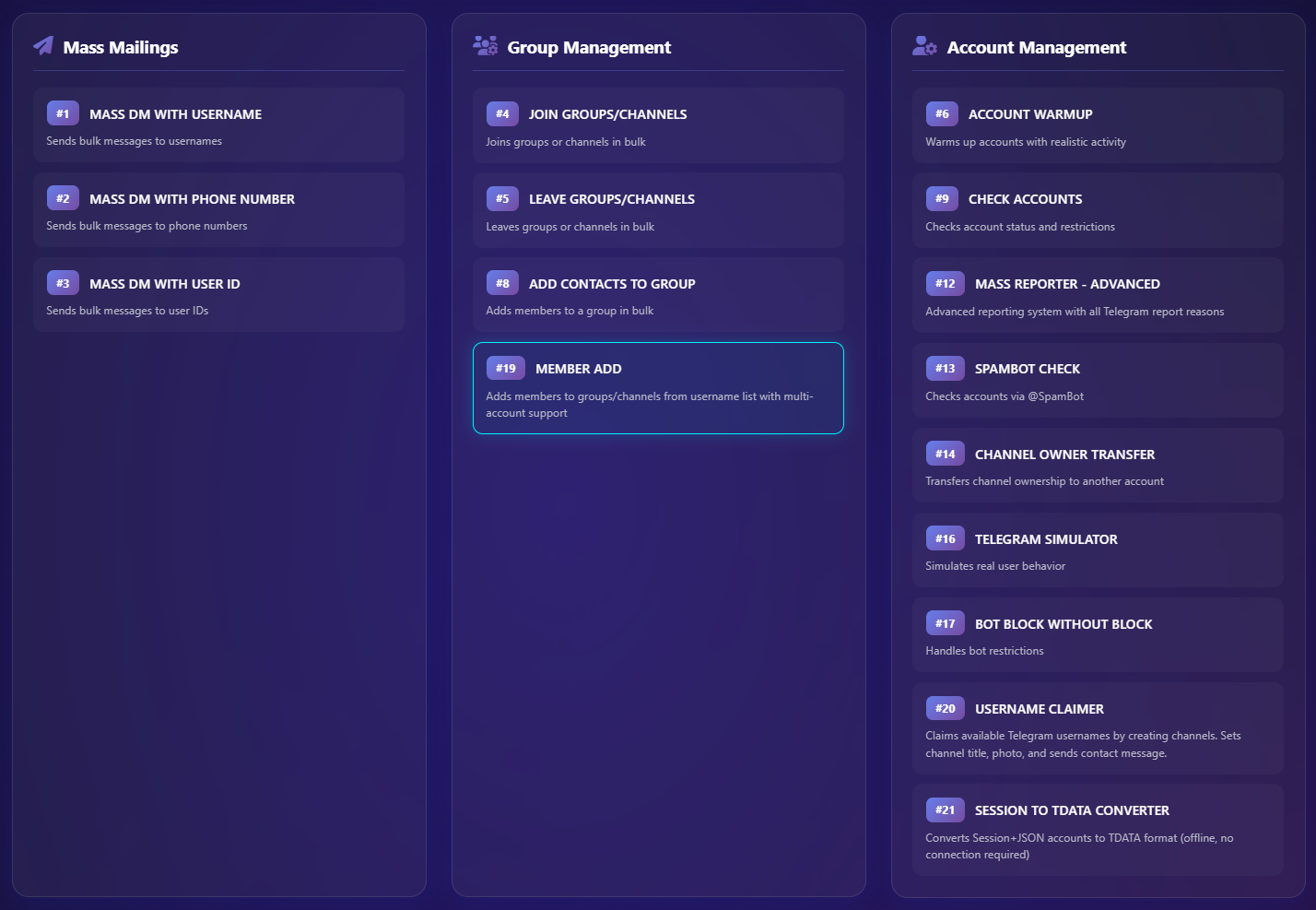
43+ Features in Our Telegram Member Add Bot
Our software isn't just a simple member adder - it's a complete Telegram marketing automation suite with over 43 features designed to help you grow and manage your Telegram presence effectively.
Core Adding Features
The member adding module supports both telegram add member to channel and telegram add member to group operations with these capabilities:
- Mass Member Adding: Add scraped members to any group or channel you admin
- Multi-Account Rotation: Automatically switch between accounts to maximize daily additions
- Smart Delay System: Configurable random delays between 15-120 seconds for natural behavior
- Premium Member Filtering: Target only Telegram Premium users for higher engagement
- Activity Filtering: Filter by last seen status to add only active users
- Progress Tracking: Real-time dashboard showing success rates and account status
Scraping & Data Collection
- Mass Scraping: Extract 10,000+ members from any public group or channel
- Hidden Member Scraping: Access members hidden from regular view where possible
- Message Scraping: Collect messages for content research and engagement analysis
- Export to CSV: Save all data in standard format for external processing
Additional Automation
- Mass DM: Send bulk direct messages to scraped member lists
- Auto-Reply (AFK): Automatically respond when you're away
- Message Forwarding: Auto-forward messages between groups/channels
- Auto Join/Leave: Programmatically join or leave groups
- Profile Management: Bulk update usernames, bios, and profile pictures
- Ban & Spam Checker: Verify account health before operations
For creators and influencers, combining this tool with Telegram OnlyFans promotion strategies can significantly boost your subscriber base.
Telegram Add Member to Group vs Channel
Understanding the difference between telegram add member to group and telegram add member to channel is crucial for choosing the right growth strategy.
| Feature | Telegram Group | Telegram Channel |
|---|---|---|
| Member Limit | 200,000 | Unlimited |
| Member Interaction | Can chat with each other | View-only (broadcast) |
| Admin Requirements | Admin with Add Members permission | Admin with Add Subscribers permission |
| Best Use Case | Community discussions, support | Announcements, content distribution |
| Member Visibility | Members can see each other | Subscribers are hidden |
| Adding Speed | Standard limits apply | Standard limits apply |
The process of how to add member to telegram group versus channel is nearly identical in our software - you simply select the target URL and the bot handles the rest. The main consideration is ensuring you have the appropriate admin permissions.

Safety Best Practices for Member Adding
When learning how to add member in telegram group at scale, safety should be your top priority. Following these guidelines ensures long-term success without risking account bans.
⏱️ Proper Delays
Use 15-60 second delays between adds to mimic human behavior
🔄 Account Rotation
Distribute adds across multiple accounts (50-200 per account daily)
🌐 Unique Proxies
Assign one proxy per account to avoid IP-based restrictions
Account Preparation
Before you add member telegram channel or group operations, ensure your accounts are properly warmed:
- Use accounts that are at least 1-2 weeks old
- Complete profile with photo, username, and bio
- Have some natural chat history
- Join 5-10 groups and participate briefly
- Send/receive messages with real contacts
What to Avoid
- ❌ Adding more than 200 members per account per day
- ❌ Using delays shorter than 15 seconds
- ❌ Running multiple accounts on the same IP without proxies
- ❌ Adding to groups where you're not admin
- ❌ Using brand new accounts for mass operations
Frequently Asked Questions
Here are answers to the most common questions about using a Telegram Member Add Bot and how to add member in telegram group without contacts.
What is a Telegram Member Add Bot?
A Telegram Member Add Bot is automation software that helps you add members to telegram group or channel automatically. It scrapes members from competitor groups and adds them to your own group without needing their contact information. Our software includes 43+ features for comprehensive Telegram growth automation.
How to add member in telegram group without contacts?
To add member in telegram group without contacts, use our Telegram Member Add Bot that works with usernames instead of phone numbers. The software scrapes @usernames from public groups, then automatically searches and adds each user to your group. No saved contacts or phone numbers are required for this process.
How many members can I add per day?
Telegram limits each account to 50-200 adds per day depending on account age and reputation. With our multi-account bot, using 10 accounts means you can add 500-2000+ members daily. We recommend starting slowly and scaling up as your accounts warm up.
Is the Telegram Member Add Bot safe to use?
Yes, when used correctly with proper safety measures. Our software includes built-in protections: ban detection, spam checking, automatic pausing on errors, and configurable delays. Following our recommended settings (15-60 second delays, 50-200 adds per account daily) keeps your accounts safe.
Can I add member telegram channel using this bot?
Absolutely! The software supports both telegram add member to channel and telegram add member to group operations. For channels, ensure you have admin permissions with "Add Subscribers" enabled. The process is identical - scrape, import, configure, and start adding.
How to add new member to telegram group from another group?
To add new member to telegram group from another group: 1) Use the scraper to extract members from the source group, 2) Export to CSV, 3) Import into the member adder, 4) Select your target group, 5) Configure 15-60 second delays, 6) Start adding. The bot handles the entire add member group to group telegram process automatically.
What's the difference between group and channel adding?
For telegram add member to group, members can interact with each other (200K limit). For telegram add member to channel, members are subscribers who receive broadcasts (unlimited). Both use the same adding process in our software - just select the appropriate target URL.
How does add member group to group telegram work?
Add member group to group telegram means transferring members between groups. Our bot scrapes all accessible members from the source group, filters out bots and inactive accounts, then systematically adds real active members to your destination group with proper delays between each addition.
What features are included?
Our Telegram Member Add Bot includes 43+ features: mass scraping (10K+), member adding, premium member filtering, multi-account management, proxy support, Mass DM, auto-reply, message forwarding, ban checker, spam checker, profile management, and real-time analytics. It's a complete Telegram marketing automation suite.
How to add member to telegram group using username only?
To add member to telegram group using username only: use our scraper to collect usernames in @username format from target groups, import the list into the member adder, and the bot automatically searches each username and adds them to your group. No phone numbers or saved contacts needed.
Has Telegram member adding changed in 2026?
Yes. As of 2026, Telegram enforces tighter early-life add limits on new accounts and triggers flood-wait pauses faster on burst adding, so slower delays (30-60 seconds) and properly warmed accounts are essential. More users have also enabled the "who can add me to groups" privacy option, which increases skip rates on scraped lists. The most reliable 2026 approach is quality scrapes plus aged accounts and a follow-up Mass DM sequence, rather than chasing raw daily volume.
🚀 Ready to Grow Your Telegram Community?
Get instant access to our Telegram Member Add Bot with 43+ features. Start adding targeted members to your groups and channels today.
Related Resources
Explore more tools and guides to maximize your Telegram growth strategy:
- Telegram Member Adder - Done-for-you member adding service
- Telegram Member ADD Software - Complete software documentation
- Telegram Mass DM - Bulk messaging campaigns
- Telegram Search Ranking Service - Boost your visibility in Telegram search
- Telegram OnlyFans Promotion - Creator growth strategies
Questions about how to add member in telegram group?
Our team is ready to help you set up your first successful member adding campaign.
💬 Get Free Consultation