 Telegram Growth Studio
Telegram Member Add Software: Complete Guide to Add Members to Groups & Channels (2026)
Looking for the most effective way to add member to Telegram group or channel at scale? Whether you're wondering how to add member in Telegram group without contacts, trying to telegram add member to channel, or need to add member group to group telegram, this comprehensive guide covers everything you need to know about Telegram Member Add Software.
Growing a Telegram community manually is time-consuming and limited by Telegram's built-in restrictions. Our Telegram Member Add Software automates the entire process, allowing you to add members to Telegram group and channel efficiently while maintaining account safety. With 43+ automation features, multi-account support, and advanced proxy rotation, this software is the industry standard for Telegram growth professionals.
Telegram Member Adding in 2026: What Changed
As of 2026, Telegram's anti-spam systems have grown noticeably stricter, so the way you add members to Telegram group matters more than raw volume. Fresh, unwarmed accounts now hit "PeerFloodError" and temporary add-restrictions far faster than they did a year ago, which is why conservative pacing has become the default rather than the cautious option. In 2026 we recommend tightening daily limits to 30-80 adds per aged account, leaning on slower 30-90 second intervals, and prioritizing recently active, non-premium-restricted targets your scraper filters surface. The 200-subscriber direct-add ceiling for channels still applies, so invite-link distribution remains essential past that point. Account quality is now the single biggest factor in success rates — a properly aged, trust-built account out-adds five cold ones. Start with our Telegram account warm-up plan, or skip the wait with our done-for-you Telegram member add service.
Video Tutorial: How to Use Telegram Member Add Software
Watch our step-by-step tutorial showing exactly how to add member in Telegram group and channel using our automation software. This video covers installation, account setup, member scraping, and the complete adding process.
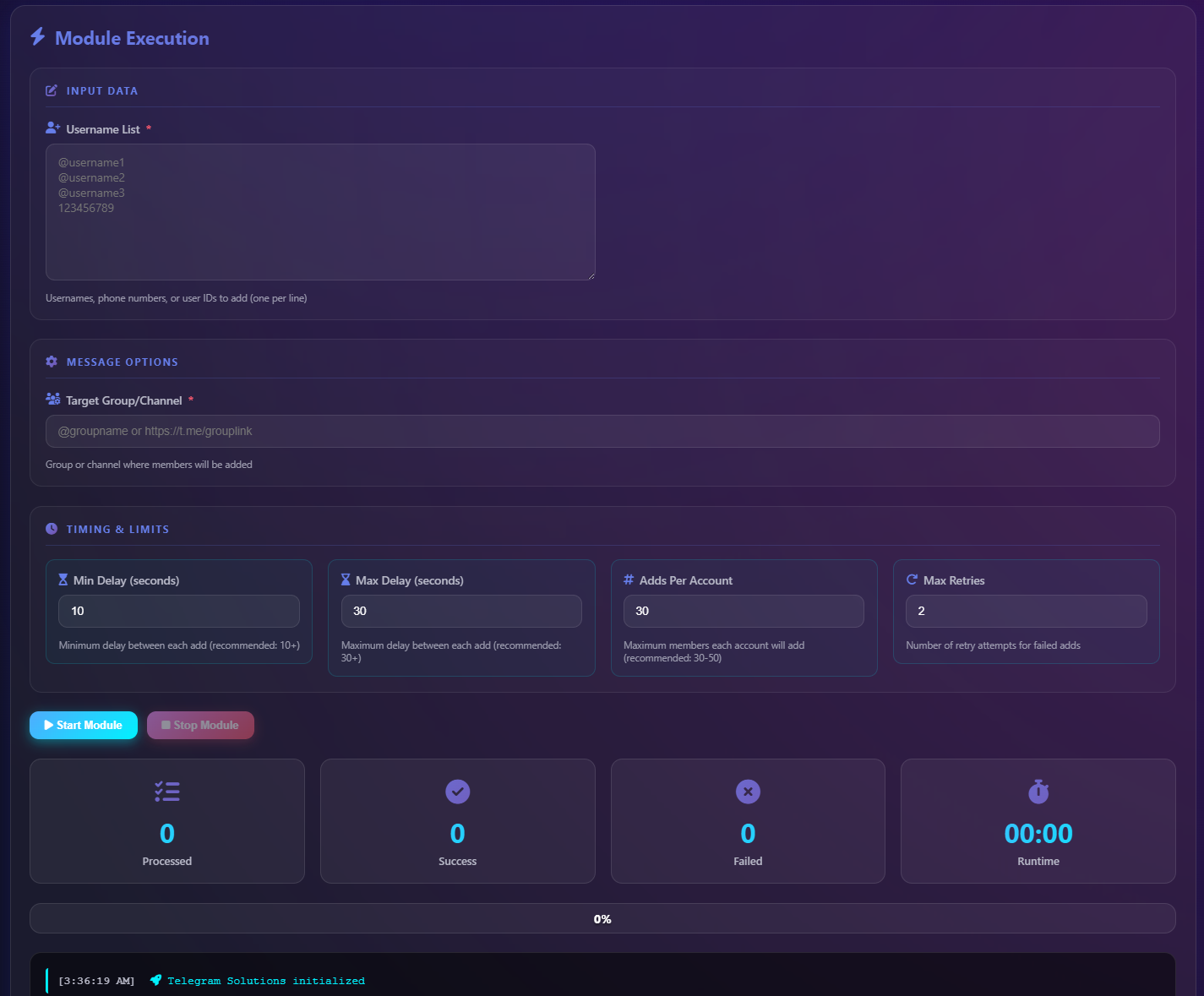
What is Telegram Member Add Software?
Telegram Member Add Software is a professional automation tool designed to help community managers, marketers, and business owners add members to Telegram group and channel at scale. Instead of manually adding users one by one, the software automates the entire workflow: from scraping members from competitor communities to adding them to your destination with safe pacing controls.
The software answers the most common questions Telegram marketers have: how to add member in Telegram group without contacts, how to add new member to Telegram group in bulk, and how does telegram add member to channel work beyond the 200-subscriber limit. With support for CSV imports, username-based adding, and multi-account rotation, you can grow your community from zero to thousands without risking account bans.
Core Features of Telegram Member Add Software
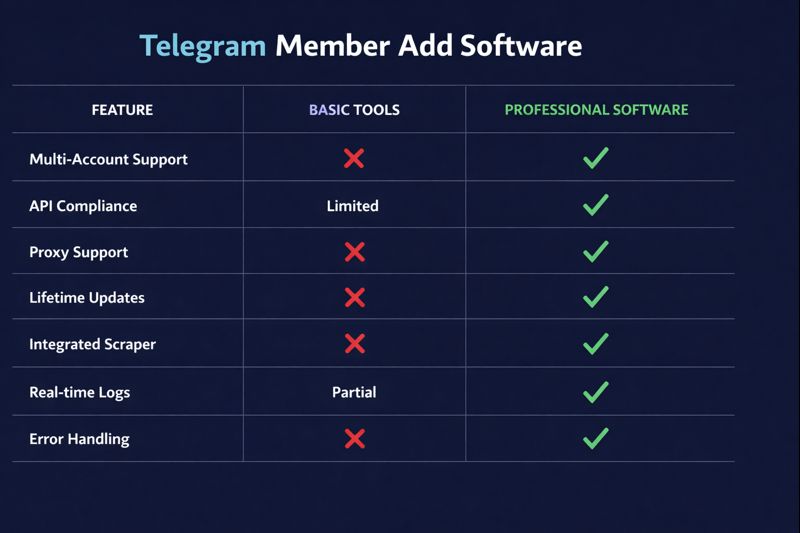
Our Telegram Member Add Software includes 43+ automation modules. Here are the features specifically designed for adding members to Telegram groups and channels:
Multi-Account Member Adding
The software supports unlimited Telegram account logins simultaneously. When you need to telegram add member to group in large quantities, distributing the workload across multiple accounts is essential. Each account can safely add 50-200 members per day. With 10 accounts, you scale to 500-2,000 daily additions while keeping each account within safe limits.
CSV Import for Bulk Adding
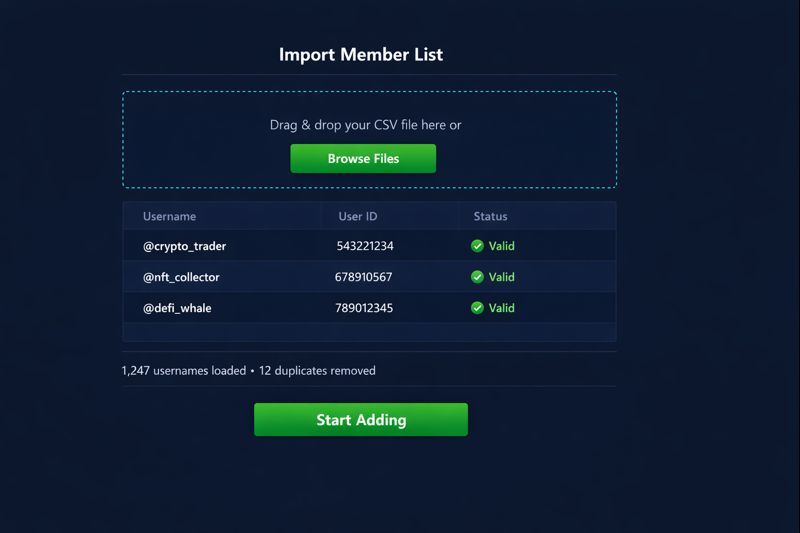
Wondering how to add member in Telegram group without contacts? The software accepts CSV files containing usernames or user IDs. Import lists from your scraping operations, CRM exports, or purchased databases. The adder module processes each entry and adds members to your Telegram channel or group automatically.
Built-in Member Scraper
Before you can add member group to group telegram, you need a target list. The integrated scraper extracts members from any public group or channel, including hidden members that don't appear in the member list UI. Filter by last active time, profile photo presence, and Telegram Premium status for higher-quality targeting. For more scraping options, see our Telegram member add tool guide.
Proxy & API Support
Professional operations require proxy support. Assign different mobile or residential proxies to each account to distribute your IP footprint. The software also supports multiple API configurations for added safety when running large-scale telegram add member to channel campaigns.
Smart Pacing Controls
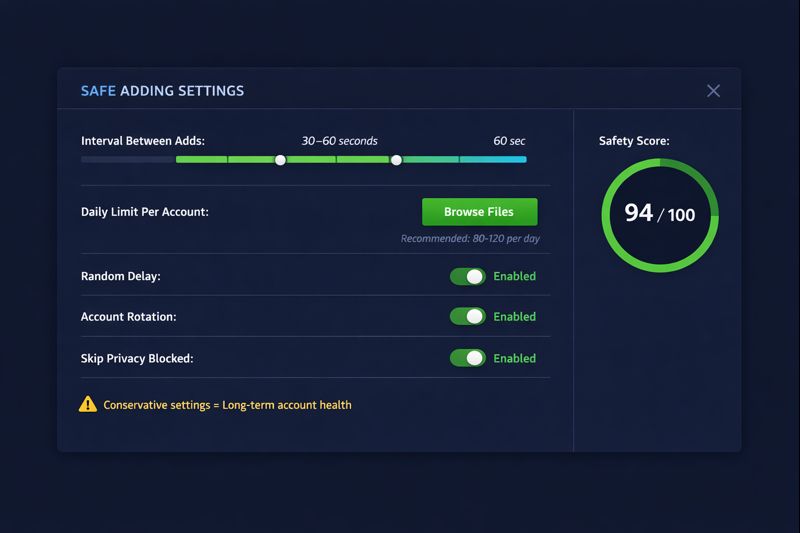
Set intervals between each add operation (15-90 seconds recommended), configure daily limits per account, and enable random delay variations to mimic human behavior. These controls are crucial for safely learning how to add new member to Telegram group without triggering spam detection.
How to Add Members to Telegram Group: Step-by-Step Process
Follow this workflow to successfully add member to Telegram group using our automation software:
Step 1: Install the Software
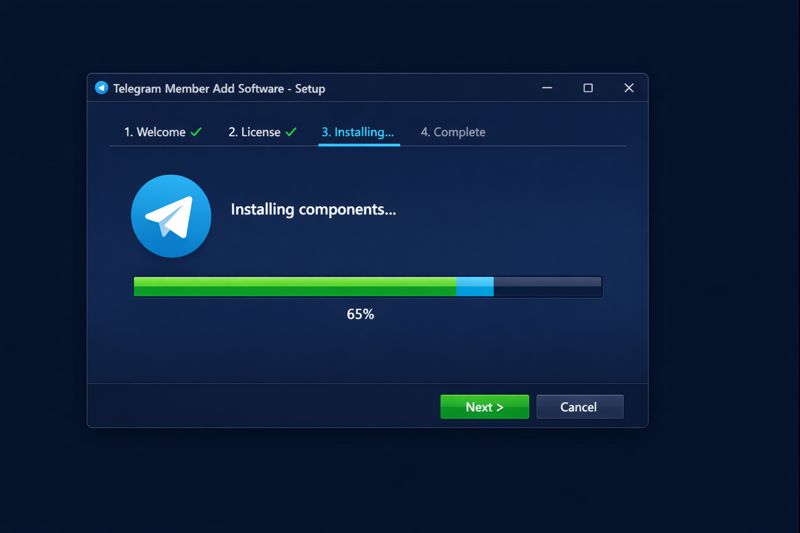
Download Telegram Member Add Software for Windows or macOS. Run the installer and complete the setup wizard. The software includes all dependencies and requires no technical configuration. Within 5 minutes, you're ready to start.
Step 2: Add Your Telegram Accounts
Connect one or more Telegram accounts to the software. You can log in using phone number (entering the verification code sent to Telegram) or import existing session files for pre-authenticated accounts. For how to add member in Telegram group at scale, we recommend starting with 5-10 accounts.
Step 3: Configure Proxies (Recommended)
Navigate to Settings and add your proxy list. Mobile proxies provide the best protection since they use real carrier IPs. Residential proxies are a cost-effective alternative. Assign each account to a different proxy for optimal distribution when running telegram add member to group operations.
Step 4: Scrape Your Target Audience
Open the Scraper module and enter the link of a competitor group or channel in your niche. The software extracts usernames, user IDs, first names, and last active timestamps. Apply filters to keep only recently active users with complete profiles. Export to CSV for use in the adder module.
Step 5: Import Members to Adder Module
Switch to the Member Add module and import your scraped CSV file. The software displays the total count and validates each entry. Remove duplicates and previously-added users automatically. Your list is ready for add member telegram channel or group operations.
Step 6: Select Destination Group or Channel
Enter the link or username of your destination Telegram group or channel. The software verifies your admin permissions and confirms the destination is ready. For channels, remember you can only directly telegram add member to channel up to the first 200 subscribers.
Step 7: Configure Adding Parameters
Set the critical parameters that determine success:
- Interval between adds: 15-30 seconds for conservative, 30-60 seconds for safe
- Daily limit per account: 50-100 for new accounts, up to 200 for aged accounts
- Random delay variation: Enable ±5-15 seconds for human-like patterns
- Account rotation: Automatic switching between accounts after X adds
Step 8: Start the Adding Process
Click Start and monitor the progress dashboard. The software displays real-time statistics: successful adds, errors, skip reasons, and completion percentage. For how to add new member to Telegram group safely, let the process run at configured pace rather than rushing.
Video Tutorial: Telegram Scraper Software for Member Extraction
Before adding members, you need a quality target list. Watch this tutorial on using the built-in scraper to extract members from any Telegram group or channel. This is essential knowledge for anyone asking how to add member group to group telegram.
How to Add Member in Telegram Group Without Contacts
One of the most frequent questions is how to add member in Telegram group without contacts. Telegram's native app requires users to be in your contacts before adding them to groups. Our software bypasses this limitation through username-based adding:
The Telegram API allows adding users by their @username or numeric user ID, regardless of whether they're in your phone contacts. Telegram Member Add Software leverages this capability to add members to Telegram group directly from CSV lists. Simply import a file containing usernames (e.g., @john_doe, @crypto_trader123) and the software handles the rest.
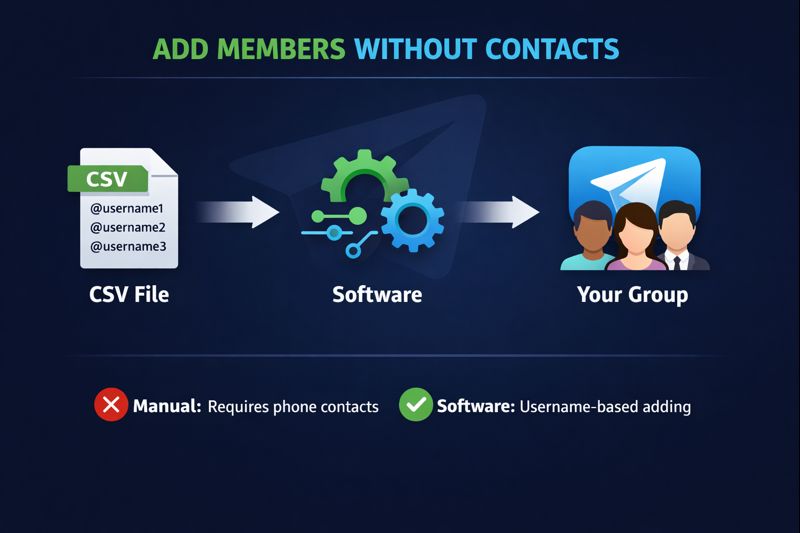
This method works because you're essentially inviting users who have public usernames. The process respects Telegram's rate limits and user privacy settings. If a user has disabled "Who can add me to groups" for everyone except contacts, they'll be skipped automatically with an error code you can review.
Methods to Add Members Without Contacts:
- By Username: Import @usernames from scraped data or purchased lists
- By User ID: Numeric IDs work even if username is hidden
- Via Invite Link: Mass DM the link to scraped users who then join voluntarily
- From Other Groups: Scrape and add member group to group telegram workflow
How to Telegram Add Member to Channel
Adding members to Telegram channels has specific limitations. Unlike groups, telegram add member to channel only works for the first 200 subscribers. After that, users must join voluntarily through invite links.
Here's the strategic approach for channel growth with Telegram Member Add Software:
Phase 1: Direct Adding (First 200)
Use the Member Add module to directly add member telegram channel until you reach 200 subscribers. These should be your highest-quality, most relevant targets since they'll see all your future content and help establish initial engagement metrics.
Phase 2: Invite Link Distribution
Beyond 200, switch to our Mass DM service. The software sends personalized messages containing your channel invite link to scraped targets. This combines member adding with outreach for continued growth.
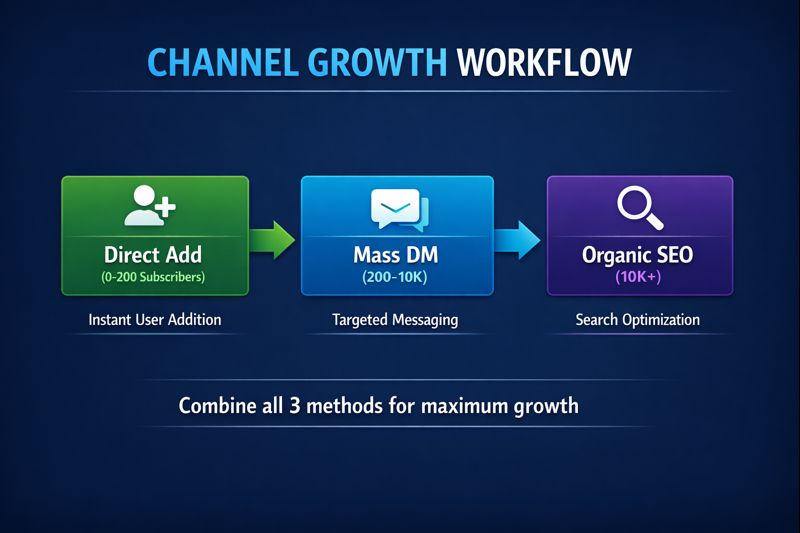
Phase 3: Organic Discovery
Optimize your channel for Telegram search with our Telegram SEO service. Combine paid growth with organic discovery for sustainable long-term results.
Add Member Group to Group Telegram: Complete Migration Guide
Need to migrate members from one group to another? The add member group to group telegram workflow is straightforward with our software:
- Join the source group with your scraping account(s)
- Run the scraper to extract all member usernames and IDs
- Apply quality filters for active users only
- Export to CSV with validated data
- Import into Member Add module
- Select destination group where you have admin rights
- Start the adding process with safe pacing
This workflow is ideal for consolidating communities, migrating from a competitor's abandoned group, or creating niche-specific subgroups from a larger community. The same members can be added to multiple destination groups if needed.
Best Practices for Safe Telegram Member Adding
To successfully add member to Telegram group without account bans, follow these proven guidelines:
Account Quality Matters
Use aged, warmed-up Telegram accounts. New accounts have strict rate limits and are more likely to trigger spam detection. Our Telegram member add service provides pre-warmed accounts ready for member adding operations.
Conservative Pacing Wins
Aggressive adding leads to bans. Set intervals of 30-60 seconds between adds and limit to 50-100 adds per account per day initially. As accounts age and establish trust, you can gradually increase to 150-200 daily.
Proxy Rotation is Essential
Running multiple accounts from the same IP is a red flag. Assign unique mobile or residential proxies to each account. The software handles automatic proxy assignment and rotation during operations.
Target Quality Over Quantity
Adding 10,000 irrelevant members hurts your community more than it helps. Use the scraper's filters to target recently active users who are genuinely interested in your niche. Higher-quality members engage, stay, and don't report your group as spam.
Respect Privacy Settings
When the software encounters users who have blocked adds from non-contacts, it logs them and moves on. Don't try to force adds or use workarounds – respect user preferences and focus on receptive targets. If you encounter competitor abuse or need to protect your community, explore our Telegram ban service and mass report bot for enforcement.
Telegram Member Add Software Pricing
Our Telegram Member Add Software uses a one-time lifetime license model. No recurring subscriptions, no per-member fees, no usage caps.
Lifetime License
- ✓ Member Add Module
- ✓ Scraper Module
- ✓ Mass DM Module
- ✓ 43+ Automation Features
- ✓ Multi-Account Support
- ✓ Proxy Integration
- ✓ Lifetime Updates
- ✓ Onboarding Support
Need accounts and proxies too? Ask about our member add bundles that include everything needed to start adding members to Telegram groups immediately.
Telegram Member Add Software vs Manual Adding vs Bots
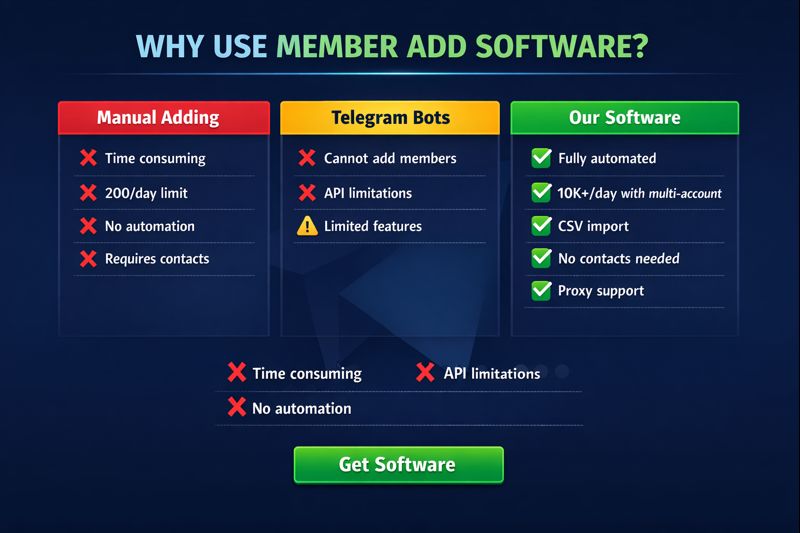
Why use dedicated software instead of manual work or Telegram bots?
Manual Adding Limitations
Telegram's native app limits you to adding contacts one at a time. You're capped at 200 adds per day per account, with no automation, no progress tracking, and significant time investment. For anyone serious about learning how to add member in Telegram group at scale, manual isn't viable.
Telegram Bot Limitations
Bots cannot add users to groups or channels directly – Telegram's Bot API doesn't support this function. Bots can only manage users who initiate contact first. This makes them useless for telegram add member to group operations. However, bots are effective for other automation tasks like our Telegram mass report tool.
Dedicated Software Advantages
Telegram Member Add Software operates through the full Telegram client API (MTProto), which supports all native functions including member adding. Combined with multi-account management, proxy support, and automation, it's the only viable solution for scaling add member telegram channel and group operations.
Who Uses Telegram Member Add Software?
Our software serves diverse use cases across industries:
Crypto & Web3 Projects
Token launches, NFT communities, and DeFi projects need rapid community growth. Add member to Telegram group operations help establish social proof before announcements and ensure your message reaches interested audiences. Learn more about crypto Telegram marketing strategies for maximum impact.
Marketing Agencies
Agencies managing multiple client Telegram communities use the multi-account features to run parallel campaigns. One software license covers unlimited projects and clients. Explore our Telegram marketing agency services for white-label solutions.
Content Creators & Influencers
YouTubers, OnlyFans creators, and influencers use Telegram for direct fan engagement. Telegram add member to channel helps build a dedicated subscriber base beyond platform algorithms. Check our Telegram channel promotion guide for growth strategies.
E-commerce & SaaS
Businesses use Telegram groups for customer support, product announcements, and community building. The software accelerates growth for new community launches.
Frequently Asked Questions: Telegram Member Add Software
How to add member in Telegram group without contacts?
You can add member in Telegram group without contacts using their username or user ID. Telegram Member Add Software automates this by accepting CSV files with usernames scraped from other groups. The software bypasses the contacts requirement through Telegram's API, allowing you to add anyone with a public username directly to your group.
How to add member in Telegram group?
To add member in Telegram group, you have two options: manual and automated. Manually, open the group, tap the name, select "Add Members," and search by contact or username. For bulk operations, use Telegram Member Add Software which imports CSV lists and adds hundreds of members automatically with safe pacing and multi-account rotation.
How to add member to Telegram group?
Adding a member to Telegram group requires either their phone number (contact), username, or user ID. Our software simplifies this by accepting CSV files with any identifier. Import your target list, select the destination group, configure intervals (30-60 seconds recommended), and start the automated adding process.
How to add new member to Telegram group?
To add new member to Telegram group, first acquire their username through scraping or research. Import into Telegram Member Add Software, select your group as destination, and run the adder. For new groups, start with high-quality targets who will engage and establish positive community dynamics.
How does telegram add member to channel work?
Telegram add member to channel is limited to the first 200 subscribers – this is a Telegram platform restriction. Use our software to directly add these initial 200, then switch to Mass DM campaigns to share your channel invite link with additional targets. This hybrid approach achieves unlimited channel growth.
Can I add member group to group telegram?
Yes, you can add member group to group telegram by first scraping the source group's members, then importing that list into the adder module for your destination group. The software handles the complete workflow: scrape → filter → export → import → add. This is ideal for group migrations or consolidations.
What's the daily limit for add member telegram channel?
For add member telegram channel operations, you can directly add up to 200 subscribers total (not per day – this is an absolute limit). Per account, daily adding limits are 50-200 depending on account age. Using multiple accounts with our software, you can reach the 200 channel limit quickly and safely.
Is telegram add member to group safe?
Telegram add member to group is safe when done correctly. Use aged accounts, rotate proxies, set 30-60 second intervals, and respect daily limits of 50-200 per account. Our software includes anti-ban features like randomized delays and multi-API support. Aggressive or spammy behavior causes bans – conservative settings ensure account safety.
How many members can I add per day?
With Telegram Member Add Software, expect 50-200 safe adds per account per day. Using 10 accounts with proper proxy rotation, you can add 500-2,000 members daily. Using 50 accounts, scale to 2,500-10,000 daily. The software manages account rotation automatically to stay within safe limits.
Do I need admin rights to add members?
For groups, you need the "Add Members" admin permission or the group must allow all members to add others. For channels, you need admin rights with "Add Subscribers" permission. The software checks your permissions before starting and alerts you if access is insufficient.
Is Telegram member adding still safe in 2026?
Yes, but in 2026 the margin for error is smaller. Telegram's spam detection now flags fresh accounts and aggressive pacing more quickly, so safe member adding depends on aged, warmed-up accounts, unique proxies per account, and conservative limits of 30-80 adds per account per day with 30-90 second intervals. Used this way, Telegram Member Add Software remains safe and effective — the bans almost always come from cold accounts or rushed settings, not the method itself.
Related Resources
- Telegram Mass DM Service – Bulk Outreach
- Telegram Member Add Tool – Complete Guide
- Telegram Mass Report Tool
- Telegram Mass Report Bot
- Telegram Member Add Service (Done-For-You)
- Telegram Search Ranking & SEO
- Telegram Marketing Agency Services
- Crypto Telegram Marketing Guide
- Telegram Channel Promotion Strategies
- Telegram Ban Service (Account Protection)