 Telegram Growth Studio
Telegram Member Add Tool | Bulk Member Adder Software 2026
Growing a Telegram group or channel organically takes months of consistent effort. A Telegram member add tool accelerates this process by automating member invitations from targeted sources, helping you build an engaged community in days rather than months.
This comprehensive guide covers everything you need to know about using Telegram member adder software: from installation and configuration to advanced strategies for maximizing results while keeping your accounts safe. Whether you're building a business community, launching a crypto project, or scaling a content channel, mastering the Telegram member add tool is essential for rapid growth.
Telegram Member Adding in 2026: What Changed
As of 2026, Telegram's anti-spam layer is noticeably stricter on bulk adds. The platform now correlates new accounts more aggressively by device fingerprint and IP, so fresh, unwarmed accounts hit PEER_FLOOD faster than they did a year ago. In 2026, the safe ceiling has effectively dropped: plan for 20-40 adds per account per day rather than pushing the old 50-cap, and lean on multi-account rotation through clean residential proxies.
The bigger 2026 shift is that USER_PRIVACY_RESTRICTED now blocks the majority of scraped users, since "Who can add me to groups" defaults to contacts-only for most new sign-ups. The current best practice is a hybrid: add the openly-addable share, then reach the rest with consent-based outreach via our Telegram Mass DM service. Pairing fresh accounts with a structured account warm-up plan remains the single biggest factor in keeping add success rates high this year.
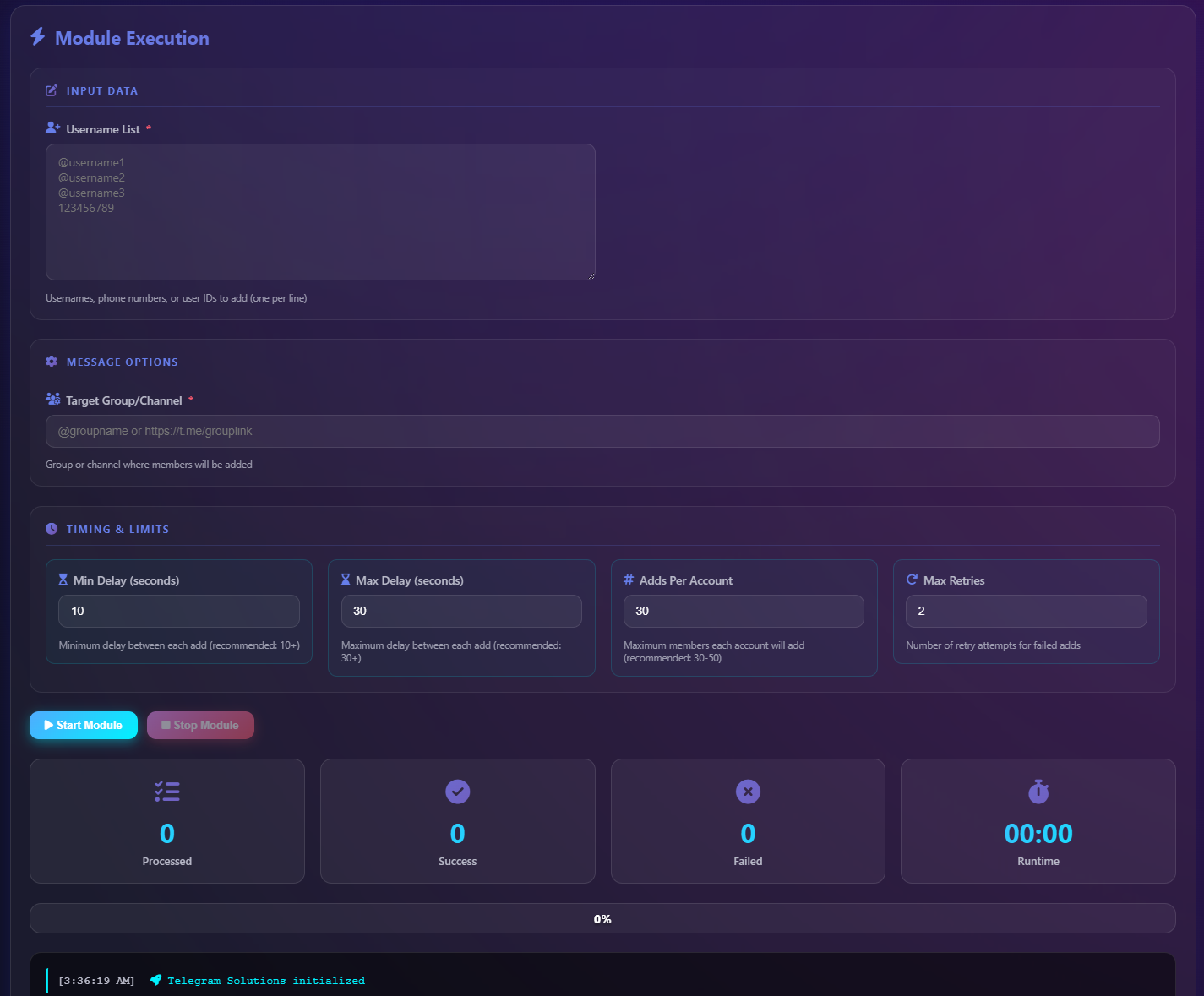
Video Tutorial: How to Use Telegram Member Add Software
Watch our complete walkthrough showing how to set up and use the Telegram member add tool to add targeted members to your groups and channels. This tutorial covers installation, account authentication, CSV import, interval configuration, and monitoring the adding process.
The video demonstrates the complete workflow from downloading the software to successfully adding your first batch of members. Follow along step-by-step to master the Telegram group member adder and start growing your community today.
What is a Telegram Member Add Tool?
A Telegram member add tool is specialized software that automates the process of inviting users to join your Telegram groups or channels. Instead of manually clicking through profiles and sending individual invitations, the member adder handles hundreds of invitations systematically using Telegram's official API.
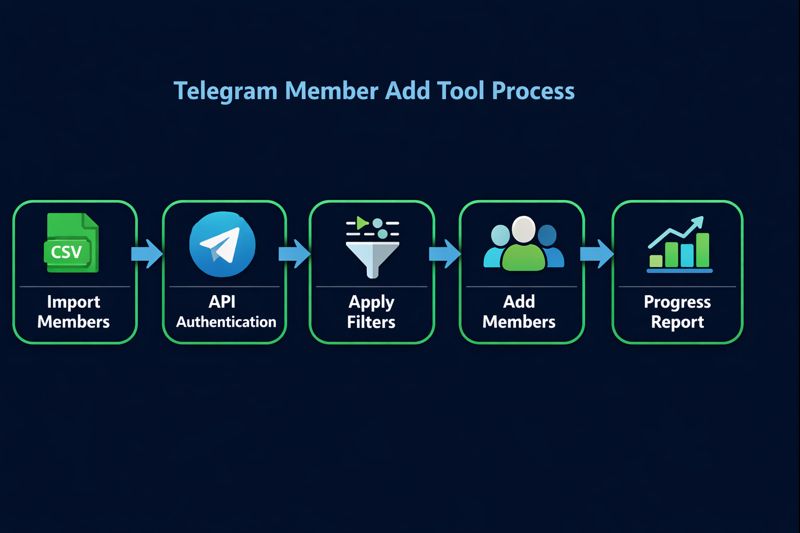
The software connects to your Telegram account via API credentials, imports a list of target usernames (typically from a CSV file), and adds them to your destination group or channel with configurable delays between each invitation. This automation is essential for anyone serious about Telegram marketing or community building.
Core Functions of Telegram Member Add Software
CSV Import: Load thousands of target usernames from spreadsheet files exported by scraper tools or manual compilation.
Multi-Account Support: Connect multiple Telegram accounts to bypass daily adding limits and scale your growth campaigns.
Interval Configuration: Set custom delays between each add (5-90 seconds) to mimic human behavior and avoid detection.
Error Handling: Automatically skip users who can't be added due to privacy settings or other restrictions.
Progress Tracking: Real-time logs showing successful adds, failures, and completion statistics.
Why Use a Telegram Member Adder?
Manual community building on Telegram is extremely time-intensive. Adding 100 members manually might take 2-3 hours of repetitive clicking. A Telegram member add tool completes the same task in under 30 minutes while you focus on creating content or managing your business.
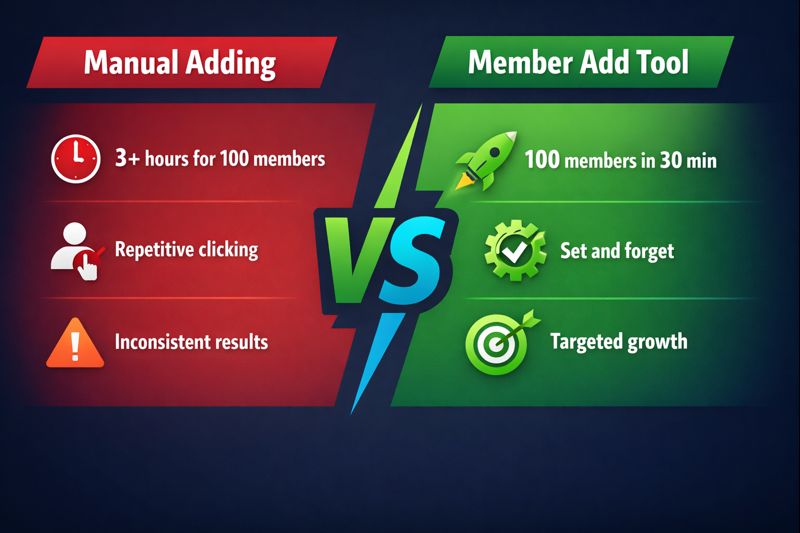
Beyond time savings, Telegram group member adder tools offer strategic advantages that manual adding simply cannot match.
Targeted Growth: Import members from competitor groups or niche communities who are already interested in your topic. These aren't random users—they're pre-qualified leads who engage with content similar to yours.
Consistent Scaling: Grow your group steadily with daily batches rather than sporadic manual efforts. Consistency is key for algorithmic visibility on Telegram's search and discovery features.
Data-Driven Optimization: Track which source groups provide the highest-quality members. Refine your targeting based on engagement metrics from each batch.
Resource Efficiency: One person with a Telegram member add tool can accomplish what previously required a team of virtual assistants, reducing operational costs significantly.
Step-by-Step Guide: Using Telegram Member Add Tool
Follow these detailed steps to successfully use Telegram member adder software for your growth campaigns. Each step includes tips from experienced Telegram marketers to maximize your success rate.
1Download and Install the Software
Download the Telegram member add tool from the official provider website. The software is available for Windows 8, 10, 11, and Windows Server environments. Run the installer and follow the setup wizard to complete installation. No complex configuration is required—the default settings work for most users.
2Authenticate Your Telegram Account
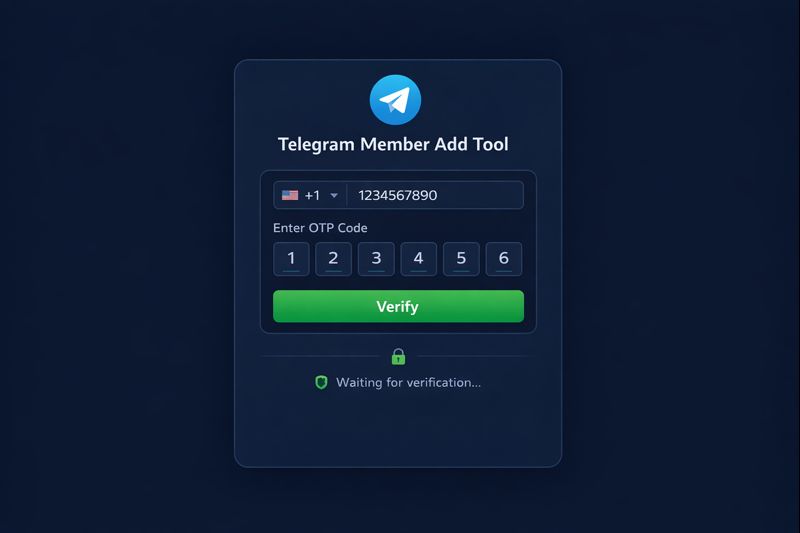
Launch the software and enter your Telegram phone number (including country code). You'll receive an OTP verification code in your Telegram app—enter this code to authenticate. The software creates a secure API session that remains active until you log out. For larger campaigns, add multiple accounts to increase your daily adding capacity.
3Prepare Your Member List
The member add tool requires a list of target usernames in CSV format. You can obtain this list by scraping competitor groups with our Telegram scraper software, or import existing lists from your marketing database. Ensure usernames are in the @username format (one per line or comma-separated). Clean the list to remove duplicates and invalid entries before importing.
4Configure Adding Settings
Enter your destination group or channel URL (you must be an admin with "Add Members" permission). Set the interval between adds—we recommend 15-30 seconds for small batches and 45-60 seconds for larger campaigns. Enable optional filters like "skip users without profile photo" or "skip recently seen inactive" to improve member quality.
5Start Adding Members
Click the "Start" button to begin the automated adding process. The software displays real-time logs showing each successful add, skipped user (with reason), and any errors encountered. You can pause the process at any time if needed. The software automatically removes successfully added users from your import list to prevent duplicate attempts.
6Review Results and Optimize
After completing a batch, review the summary report showing total added, skipped, and failed counts. Common skip reasons include: USER_PRIVACY_RESTRICTED (user blocks invites), USER_CHANNELS_TOO_MUCH (user is in maximum groups), and USER_ID_INVALID (deleted or fake account). Use these insights to refine your source lists and improve future campaign performance.
Video Tutorial: How to Scrape Members for Your Add Tool
Before you can add members, you need a quality target list. This tutorial shows how to use Telegram scraper software to extract member usernames from competitor groups and channels. The scraped data exports directly to CSV format compatible with your Telegram member add tool.
The video covers selecting target groups, configuring scraper filters (active users, premium members, profile requirements), running extraction jobs, and exporting clean CSV files ready for import into your member adder.
Best Practices for Telegram Member Adding
Successful Telegram growth requires more than just running software. These expert strategies will help you maximize results while maintaining account safety when using your Telegram member add tool.
Account Preparation
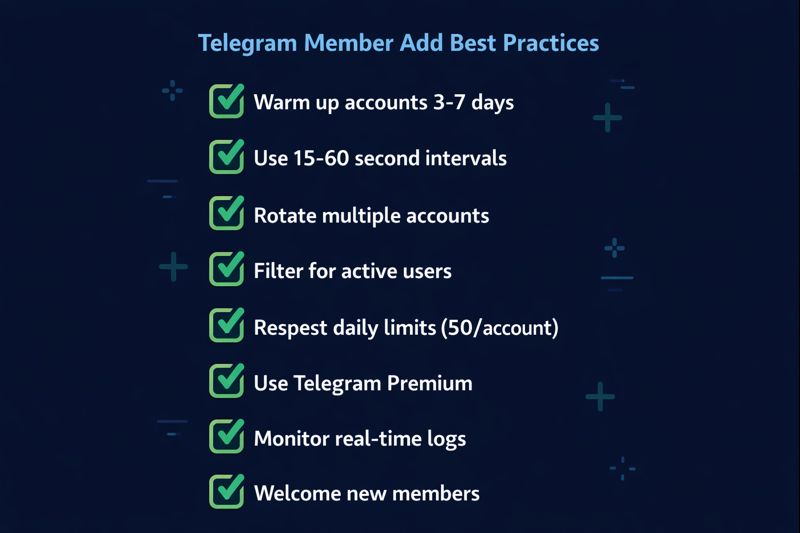
Warm Up New Accounts: Fresh Telegram accounts have strict limits. Before using them with your member adder, spend 3-7 days using them normally—join groups, send messages, react to posts. This establishes account credibility and increases adding limits.
Use Telegram Premium: Premium accounts receive higher API limits and reduced spam detection sensitivity. The investment pays for itself in increased adding capacity and reduced ban risk.
Rotate Multiple Accounts: Spread your adding across 3-5 accounts rather than pushing one account to its limits. This distributes risk and allows continuous growth even if one account faces temporary restrictions.
Targeting Strategies
Source Quality Matters: Members scraped from active, engaged groups convert better than those from inactive communities. Look for groups with recent messages, active discussions, and genuine member participation.
Niche Relevance: Add members from closely related niches rather than broadly popular groups. A crypto trading group benefits more from members of other trading communities than from general tech discussion groups.
Filter for Activity: Configure your scraper to prioritize users who were "last seen recently" over those with unknown or distant last-seen timestamps. Active users engage more after joining your group.
Campaign Management
Daily Limits: Respect Telegram's unofficial limit of ~50 adds per account per day. Pushing beyond this consistently increases ban risk. Plan campaigns across multiple days rather than aggressive single-day pushes.
Time Your Adds: Add members during your target audience's active hours. Users added while online are more likely to notice and engage with your group immediately.
Welcome Sequences: Combine member adding with automated welcome messages. Users who receive a personalized greeting are significantly more likely to stay and participate in your community.
Common Errors and Solutions
Understanding error messages from your Telegram member add tool helps you optimize campaigns and troubleshoot issues quickly. Here are the most common errors and how to handle them.
| Error Code | Meaning | Solution |
|---|---|---|
| USER_PRIVACY_RESTRICTED | User's privacy settings block group invites | Cannot be added. Skip automatically—consider Mass DM instead |
| USER_CHANNELS_TOO_MUCH | User is in maximum number of groups (500+) | Cannot be added. Remove from list to avoid future attempts |
| USER_ID_INVALID | Account is fake, deleted, or invalid | Clean your source lists more thoroughly before import |
| FLOOD_WAIT_X | Adding too fast—wait X seconds | Increase interval settings; reduce daily volume |
| PEER_FLOOD | Account flagged for spam-like behavior | Pause for 24-48 hours; reduce adding speed significantly |
| USER_NOT_MUTUAL_CONTACT | Channel requires mutual contact for adding | Use groups instead of channels, or adjust channel settings |
Telegram Member Add Tool: Features Comparison
Not all Telegram member adder software is created equal. When choosing your tool, consider these essential features that separate professional-grade solutions from basic scripts.
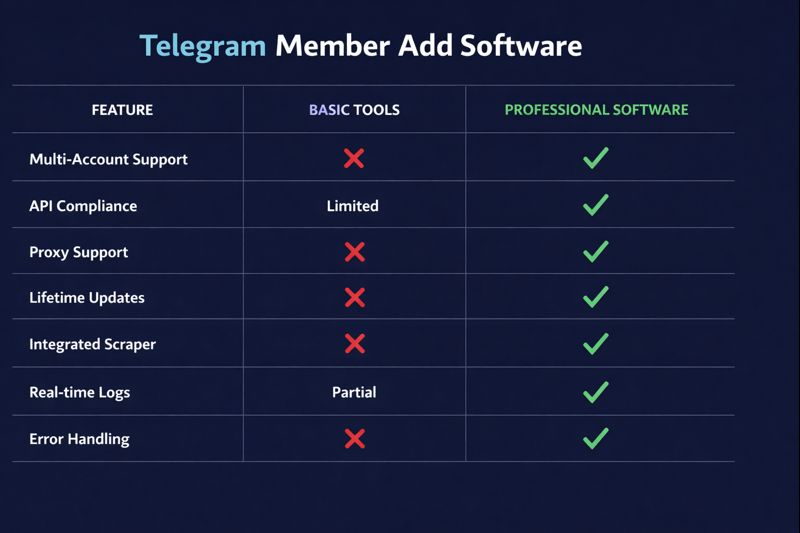
API Compliance: Quality tools use Telegram's official MTProto API rather than web scraping hacks. API-based tools are faster, more reliable, and less likely to trigger bans.
Multi-Account Management: Professional member add tools support unlimited accounts with automatic rotation. This feature is essential for scaling beyond single-account daily limits.
Proxy Support: Look for software supporting SOCKS5 or HTTP proxies. Different IP addresses per account reduces correlation and improves safety for bulk operations.
Lifetime Updates: Telegram frequently updates its API and anti-spam systems. Choose software with active development and free updates to ensure continued functionality.
Integrated Scraper: All-in-one solutions that include both scraping and adding modules streamline your workflow and ensure data format compatibility between extraction and import.
Our Telegram Growth Studio software includes all these features plus 43+ additional automation modules for comprehensive Telegram marketing.
Alternatives to Member Adding
While Telegram member add tools are powerful for rapid growth, they work best as part of a broader strategy. Consider these complementary approaches.
Mass DM Campaigns: Instead of adding users to your group directly, send personalized messages inviting them to join. This approach respects user privacy settings that block forced adds and typically produces higher engagement rates. Check our Telegram Mass DM service for managed campaigns.
Done-for-You Member Adding: Don't want to run the software yourself? Our Telegram member add service handles everything—we scrape, filter, and add targeted members to your group or channel with guaranteed delivery.
Competitor Disruption: Need to level the playing field? Our Telegram Mass Report Bot and Mass Report Tool help you report channels and groups that violate Telegram's terms of service.
Account Recovery: If your account faces restrictions during growth campaigns, our Telegram Ban Service and Telegram Unban Service can help restore access quickly.
Content Marketing: Create valuable content that naturally attracts members through Telegram's search and discovery features. This organic growth complements automated adding and produces highly engaged community members.
Account Protection: If your accounts face restrictions during growth campaigns, our Telegram ban service can help resolve issues quickly. For already banned accounts, the Telegram unban service provides professional recovery assistance. You can also use our mass report tool to handle competitors who abuse reporting systems against your channels.
Frequently Asked Questions
What is a Telegram member add tool?
A Telegram member add tool is software that automates the process of adding members to Telegram groups or channels. It imports username lists from CSV files and systematically adds them to your target community using Telegram's API with configurable intervals for safety. The tool handles authentication, error management, and progress tracking automatically.
How many members can I add per day with Telegram member add software?
Telegram limits member adding to approximately 50 members per account per day. Using multiple accounts with the member add tool, you can scale this to 200-500+ members daily while maintaining account safety through proper intervals and rotation. Premium accounts typically receive higher limits.
Is using a Telegram member adder safe for my account?
Yes, when used properly with recommended settings. Professional Telegram member add tools use Telegram's official API with randomized delays between 15-60 seconds to mimic human behavior. Using warmed-up accounts and proper intervals minimizes ban risk significantly. Avoid aggressive settings that add too many members too quickly.
Can I add members to both groups and channels?
Yes, Telegram member add software works with both Telegram groups and channels. For groups, you need admin privileges with "Add Members" permission. For channels, you need to be an admin to invite subscribers using the member add tool. Some software versions offer specific modules optimized for each type.
How do I get member lists to import into the member add tool?
Use a Telegram scraper tool to extract member usernames from competitor groups or niche-related channels. Export the scraped data to CSV format, then import it into your member add software. Our Telegram Growth Studio software includes both scraping and adding modules for a complete workflow. For done-for-you member adding, check our Telegram member add service.
What's the best interval setting for adding Telegram members?
For optimal safety, set intervals between 15-60 seconds per member. 15 seconds works for smaller batches under 50 members. For larger campaigns adding 200+ members, use 30-60 second intervals. Premium Telegram accounts can handle slightly faster adding speeds, but patience always produces better long-term results.
Why do some members fail to add?
Common failure reasons include: USER_PRIVACY_RESTRICTED (user blocks group invites), USER_CHANNELS_TOO_MUCH (user is in too many groups), USER_ID_INVALID (fake or deleted account), and FLOOD_WAIT (adding too fast). The member add tool automatically skips problematic users and logs the reason for your review.
Do I need coding skills to use Telegram member add tool?
No coding skills required. Modern Telegram member add software features user-friendly interfaces where you simply enter your phone number, import a CSV file, set the target group, configure intervals, and click start. Video tutorials guide you through every step of the process.
Have member add limits changed in 2026?
Yes. As of 2026, Telegram's spam detection is tighter on unwarmed accounts, so the practical safe ceiling has dropped to roughly 20-40 adds per account per day instead of the older ~50. Many scraped users now fall under USER_PRIVACY_RESTRICTED because contacts-only invite settings are the new default. The 2026 best practice is to combine member adding with consent-based Mass DM outreach and to run only properly warmed accounts behind clean proxies.
Get Started with Telegram Member Add Tool
Ready to accelerate your Telegram community growth? Our Telegram member add tool includes everything covered in this guide—plus 43+ additional automation modules for scraping, mass messaging, account management, and more. Prefer a done-for-you solution? Our managed member add service handles everything while you focus on content.
Combine member adding with Telegram Mass DM campaigns for maximum reach. Need to protect your growing community? Our ban service and mass report bot help defend against malicious competitors.
✅ Member Add Module (Groups & Channels)
✅ Telegram Scraper (Extract 10K+ members)
✅ Mass DM System (Username, Phone, User ID)
✅ Multi-Account Management (Unlimited accounts)
✅ Proxy Support (SOCKS5/HTTP)
✅ Lifetime Updates & Support
Related Resources
- Telegram Growth Studio Software – Full Feature List
- Telegram Member Add Service (Done-for-You)
- Telegram Mass DM Service
- Buy Telegram Accounts for Automation
- Telegram Scraper Software Guide
- Telegram Channel & Group Scraper Tutorial
- Telegram Mass Report Bot
- Telegram Mass Report Tool Guide
- Telegram Ban Service
- Telegram Unban Service
- Telegram Account Warm-Up Guide
- Telegram Proxy Configuration Guide