 Telegram Growth Studio
Instagram Support Requests Inbox: Finding Reports You Made
The Instagram support requests inbox is the Support Requests screen under Help, where the app lists reports you filed and what happened to each. Instagram decides which reports appear there and how each ends. In the app, open your profile and tap Menu, Help, Reports and violations, then Reports.
What is the Instagram support requests inbox?
The Instagram support requests inbox is a status screen for your reports, not a place to chat with staff. Instagram's help article on checking a report's status calls it Support Requests. It can show the date Instagram took action and the outcome it reached.
People land on it from two directions. Some go looking after a report seems to vanish. Others confuse it with Message Requests, the Direct folder that holds messages from strangers. Those are separate screens, and mixing them up can make a report look lost when it was never meant to appear there.
Telegram Growth Studio is an independent social media services studio that explains platform tools in plain terms, and it works with no link to Instagram or Meta. Instagram decides which reports appear on this screen and how each one ends. Nobody outside Instagram can add an entry, speed one up, or change a decision shown there.
Where to see Instagram reports you made, step by step
Your reports sit under Help, in a menu Instagram now labels Reports and violations. The phone steps below match Instagram's report status article as of November 2026, when we read it on the 25th.
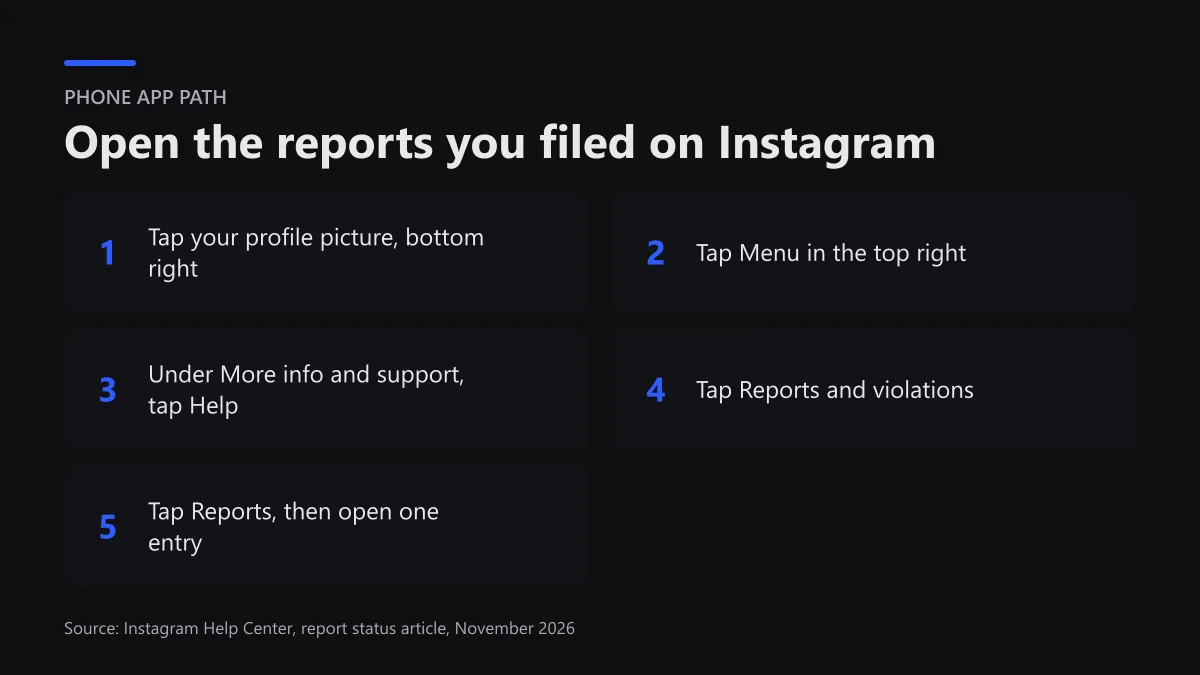
- Open your profile with the photo icon at the lower right.
- Tap Menu in the top right corner.
- Find More info and support, then pick Help below it.
- Tap Reports and violations, then tap Reports.
- Tap any report in the list to open its status.
On a computer the labels differ. Telegram Growth Studio checked the computer version of the same article, and it starts with More at the bottom left. You then pick Settings and Help, and finish with Support requests and Reports.
| Device | First taps | Middle step | Last labels |
|---|---|---|---|
| Phone app | Profile picture, then Menu | Help, under More info and support | Reports and violations, then Reports |
| Computer | More, bottom left | Settings, then Help | Support requests, then Reports |
An entry with no decision yet is still waiting on Instagram. How long it waits is a separate question. This guide to Instagram report review time explains how Meta ranks reports in its queue and why one can sit pending for a while.
What can you do inside a single report entry?
A report entry shows Instagram's decision and when it acted, links the policy involved, and may let you ask for a review. Instagram's Support Requests help page lists those options:
- Read the policy. Tap an available report to learn more about the rule it was checked against.
- See the outcome. The entry shows when Instagram took action and the decision it made.
- Ask for a second look. You can request a review of the decision, where that option exists.
That last line has a catch. The same help page says some types of content can't get a review yet, and that Instagram is adding more options. A missing review button isn't a glitch. It means the option doesn't exist for that case right now.
When the decision says nothing broke the Community Guidelines, Instagram points you to other tools. You can restrict or block the account. You can also use the Sensitive Content Control to see less content like the post you reported.
For example, take a hypothetical report about a spam account that keeps promoting example.com. If the entry says no violation was found and shows no review option, blocking that account is the step Instagram's own page suggests.
Why isn't a report showing in Support Requests?
A missing entry doesn't prove Instagram never got the report. Its status article admits some of your reports may never show up on that list. Telegram Growth Studio found no Instagram help page that promises an entry for every report.
A few other situations can also keep a report off your list:
- You filed it on Threads. Threads has its own help article for checking a report.
- You filed it without an account. Instagram's reporting article says people with no Instagram account can still report abuse or spam, and they have no app inbox to open.
- You were on another account. If you manage several profiles, check the one you were logged into when you filed.
If the list stays empty, look at the post or profile itself. Content that's gone suggests action may have been taken, even with no entry to confirm it. Content that's still up can mean the report is waiting, or that no rule was broken.
Each time you file, jot down the day, the post's URL, and the category you chose. That small record is the only trail fully in your hands.
Is Support Requests the same as message requests or a support chat?
No. Support Requests tracks reports you filed, while Message Requests is a Direct folder for messages from accounts you don't follow.
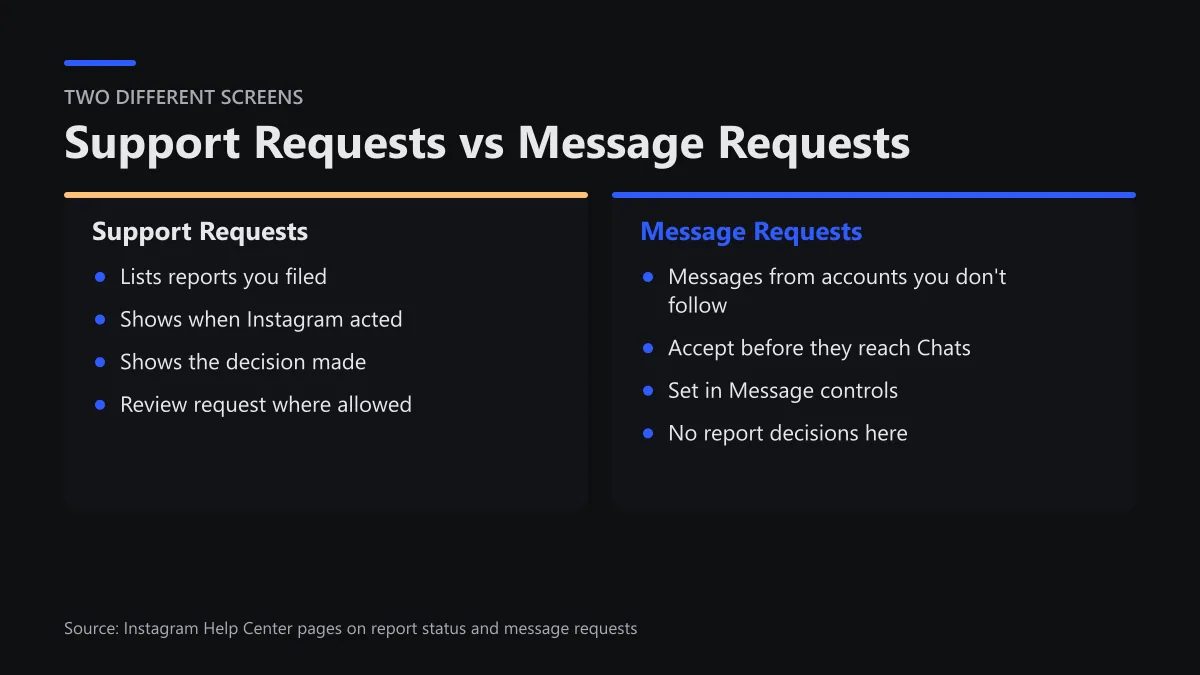
Instagram's help page on managing message requests says you have to accept a request in that folder before it moves into your Chats list. You set who can reach that folder under Messages and story replies, then Message controls. Nothing in it tells you what happened to a report.
There's no phone line behind either screen. Meta's phone support availability page states that it runs no public phone line for general customer help. It treats any number posing as Meta support as a likely scam. A search for a Support Requests phone number can surface exactly that kind of number, so don't call it. Keep your login details to yourself, too.
| Channel | What it handles | Who can use it |
|---|---|---|
| Support Requests | Status and decisions on reports you filed | Any account that filed a report in the app |
| Message Requests | Direct messages from accounts you don't follow | Every account |
| Meta AI support assistant | Account and settings questions | Instagram and Facebook users |
| Meta Verified support | Email and chat help with account issues | Verified creators and businesses |
| Phone | No general public line exists | No general line; Meta notes limited specialist lines in some regions |
Meta's support channels page is the source for the last three rows. It also names Meta Business Support Home for advertisers and a routing form for people in the European Union.
Will the person you reported find out it was you?
Not from Instagram, unless the report concerns intellectual property. Instagram's help page on filing reports keeps your identity from the reported account, with copyright and similar claims as the one exception.
Should you report again or ask others to report?
When a report stalls, two shortcuts tempt people. The first is asking friends to file the same report. Meta's Transparency Center entry on review priority names severity, virality, and the odds of a violation as its factors, and report counts aren't on that list. This explainer on mass reporting an Instagram account sets out why that route fails and what it risks.
The second shortcut is filing again through the general Report button. If the problem is impersonation, stolen photos, or private images, a dedicated form fits better. The official forms for each case are mapped out in this Instagram account takedown guide.
If someone's safety is at risk, call local emergency services first. Support Requests is a record of decisions, not an alarm, and nothing on it moves faster no matter how many times you check it.
Frequently asked questions
How do I get to Support Requests on Instagram?
Open the Instagram app and start from your profile photo at the lower right. Tap Menu in the top right, then look under More info and support for Help. Choose Reports and violations, then Reports, and a list of reports you filed opens. Instagram's report status article gives this path for the phone app, and it still read that way in November 2026. Tap any entry to see its status, the decision, and the policy behind it. Menu names can shift when the app updates. If a label is missing, open the help article and follow the version it shows for your device. The list only covers the account you're logged into, so switch first if you filed from a second profile. A report you remember filing may still be absent, since Instagram admits some reports never appear on that list.
Where can I see Instagram reports I made on a computer?
If you're asking where to see Instagram reports you made on a desktop browser, the path starts in a different spot from the phone app. Click More at the bottom left of the page, then Settings, then Help. From Help, open Support requests and then Reports. Instagram's help article on report status lists this computer path beside the app version. The list you see there shows the same reports as the app, tied to the account you're logged into. Each entry can show when Instagram acted and what it decided. Where a review is allowed, you can request one from the entry itself. If the computer menu looks different, the web layout may have changed since November 2026. In that case, use the app path or reopen the help article and pick Computer Help to see the current steps.
Does Instagram have a phone number for support requests?
No. Meta's help article on whether phone support exists says Meta and its products, Instagram included, run no public phone line for general customer help. It also tells readers to stay away from any number posing as Meta support, since such numbers are likely scams. That matters because searches for a support line can turn up such numbers on forums and ad pages. Whoever answers that kind of line may want your login details or money, and neither should leave your hands. The page does list real options. You can chat with the Meta AI support assistant inside Instagram. Paying Meta Verified members can reach staff by email or chat. Advertisers use Meta Business Support Home. People in the European Union can use a routing form. The status of a report you filed still lives in Support Requests, not on a call.
Can the person I reported see my name?
Instagram keeps your name away from the account you report, with one exception. Its help page on reporting posts and profiles names intellectual property reports, such as copyright claims, as the case where your report isn't anonymous. For everything else, the person sees at most the result: a warning, a removed post, or a limit on their account. They don't see a list of reporters. Support Requests is private to you in the same way. It shows your reports and their outcomes, and it isn't visible to the account you reported. Keep in mind that people can still guess. If you argued with someone in public and their post disappears an hour later, they may draw their own conclusion. Worried about payback? Restrict or block the account too. Instagram's report status page suggests those tools when the content stays up.
Why can't I request a review on my report?
The review option isn't open for every kind of content. Instagram's Support Requests help page says you can't request a review for some types of content and that it's adding more options over time. So a report entry with a decision but no review button isn't broken. The choice just isn't offered for that case. You still have moves. If the content is aimed at you, such as a fake profile using your photos, a dedicated form can fit better than the general Report button. If the content simply bothers you, restrict or block the account, or use the Sensitive Content Control to see less of it. Send a fresh report only if something has changed, like a new post or a sharper screenshot. Sending an identical report adds a copy, not evidence, and it won't reopen the first decision.
Is my report gone if Support Requests is empty?
Not necessarily. Instagram's report status article admits that a report you filed can be missing from Support Requests. An empty list can also mean you filed from another account, filed on Threads, or filed without logging in. Threads has its own status article, and a report sent without an account has no app inbox attached to it. The quickest check is the content itself. If the post or profile is gone, action may have been taken even though no entry confirms it. If it's still up, the report may be waiting, or Instagram may have found no rule broken. For the future, record the day, the URL, and the category each time you report. That note helps if you need to file again with new evidence or explain the history to someone at a dedicated form later.
Official sources
These official pages back the rules on this page.